
 James
James
A lookbook photo can present an outfit beautifully, but it can only ever show one static pose, one angle, one fixed moment of how a garment sits. Clothing is designed to move, and a photo alone leaves most of that design intent unseen. Image to video tools solve that directly, taking an existing lookbook photo and turning it into a short video that lets the outfit actually move the way it was meant to. Dreamina, running on its most advanced video generation model, Seedance 2.5, gives fashion brands and creators a fast route from a static shoot to something that feels like real runway footage.
Table of Contents
- Why a lookbook photo only tells part of the story
- What makes a lookbook video feel like real fashion footage
- Lookbook Photo to Video Using Dreamina
- Step 1: Upload your lookbook photo and define its movement
- Step 2: Generate with Seedance 2.5
- Step 3: Refine and export the finished clip
- What Seedance 2.5 brings to fashion motion
- Motion that reads as genuinely human
- Clear positioning through every movement
- One consistent presence throughout
- Room for a full walk or sequence
- Getting a full collection out of a single photo shoot
- Writing prompts that respect the fabric
- Choosing the right format for the collection
- A few habits that weaken a fashion video
- Photos with several models to work with
- Where these fashion videos tend to be used
Why a lookbook photo only tells part of the story
A still shot captures fit and styling, but it misses almost everything about how a garment actually behaves, how a coat swings when someone turns, how fabric catches light mid-stride, how layers shift against each other while walking. Motion lets a lookbook photo show the part of the design a photographer’s single frame can’t capture.
What makes a lookbook video feel like real fashion footage
A handful of things separate a convincing fashion clip from one that feels stiff. The walk or turn needs to look natural rather than mechanical. Lighting should highlight the fabric’s movement and texture rather than flattening it.
And the pace needs to reflect that of real-life footage, as something that is either too fast or too slow often shatters the illusion.
Lookbook Photo to Video Using Dreamina
Step 1: Upload your lookbook photo and define its movement
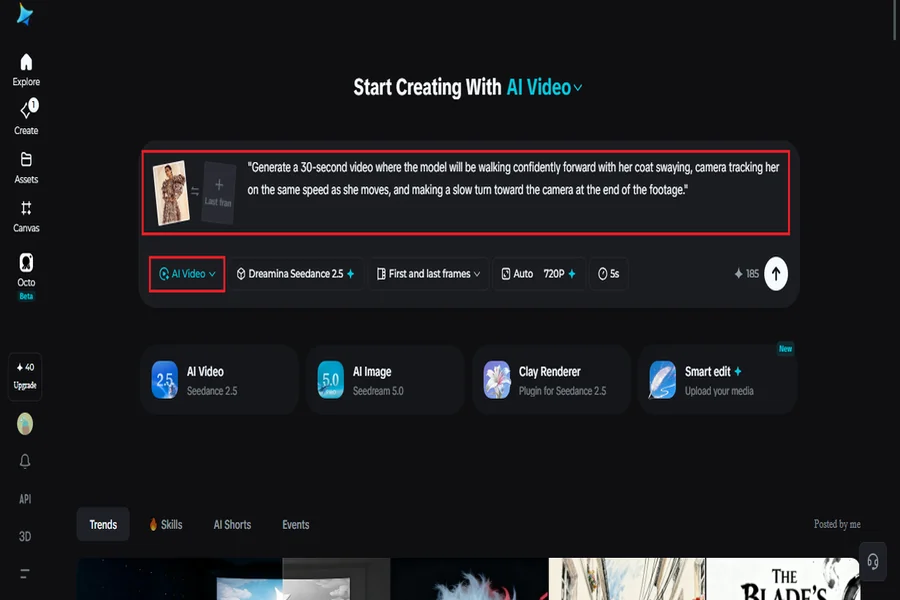
Go to Dreamina and to its “AI Video” tab. Then add your lookbook photo using the “Add reference image” function. After that, define your desired movement.
Here is the example for 30 seconds of video: “Generate a 30-second video where the model will be walking confidently forward with her coat swaying, the camera tracking her at the same speed as she moves, and making a slow turn toward the camera at the end of the footage.”
Step 2: Generate with Seedance 2.5
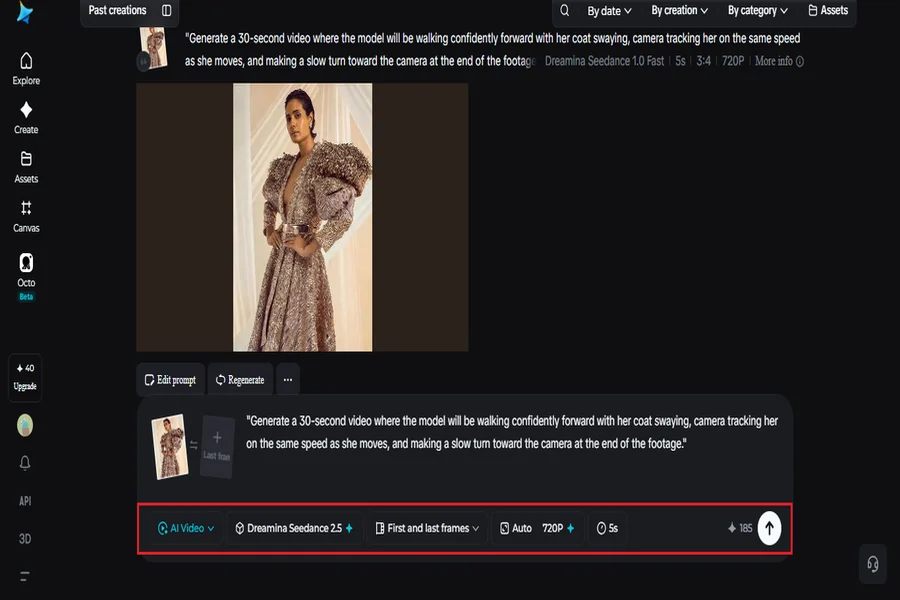
Pick the Seedance 2.5 model, choose your video length, then select an aspect ratio — 9:16 for Reels and TikTok, 16:9 for a lookbook feature or website. Tap Dreamina’s generate icon and let the outfit take shape in motion.
Step 3: Refine and export the finished clip
Run it through Dreamina’s editing tools first — Upscale sharpens fine fabric detail, Generate Soundtrack lays down a runway-style audio layer — then export and share it wherever the collection needs to be seen.
What Seedance 2.5 brings to fashion motion
Seedance 2.5, Dreamina’s most advanced video generation model, was built to handle exactly the kind of natural human movement fashion content depends on.
Motion that reads as genuinely human
Authentic motion rendering keeps a walk or turn looking believable rather than mechanical, which matters enormously in fashion footage where a stiff stride undercuts the whole clip.
Clear positioning through every movement
Spatial coherence keeps the model’s positioning clear even as the camera tracks alongside them, so a walk stays easy to follow rather than becoming disorienting.
One consistent presence throughout
Fixes for the recurring “twin” issue keep a single model from splitting into duplicate versions mid-clip, preserving a clean, professional result.
Room for a full walk or sequence
Extended duration up to 180 seconds in Ultra-long mode gives a full walk or multi-piece showcase room to unfold, rather than compressing everything into a few rushed seconds.
Getting a full collection out of a single photo shoot
A brand doesn’t need to reshoot every piece to build a video lookbook. Existing static shots from a past collection can each be animated individually, giving new life to photography that’s already been paid for and produced, rather than treating it as a one-time asset that’s done its job the moment the photoshoot wraps.
Writing prompts that respect the fabric
Naming the specific material and how it should move — flowing, structured, stiff — gives the model something concrete to render, rather than defaulting to generic cloth movement that doesn’t match the actual piece.
Choosing the right format for the collection
A vertical clip suits fast-scrolling platforms like TikTok and Instagram, while a horizontal version works better for a brand’s website or a paid campaign where viewers are likely to watch longer.
A few habits that weaken a fashion video
Some choices tend to undercut the result:
-
Choosing a lookbook photo where the outfit’s details are hard to see clearly
-
Overloading the prompt with too many actions happening at once
-
Ignoring lighting direction, which can make fabric look flat instead of dimensional
-
Skipping a description of pace, leading to a walk that feels rushed or robotic
Photos with several models to work with
It is worth noting that when working with lookbook photos which have two or three models in them, the task becomes different from the case when there is just one model in the picture because their movements must be harmonized and not random. Talking about the same actions of people in the lookbook, turning or moving in one direction, makes the models look as if they are coordinating their actions and not moving separately.
Where these fashion videos tend to be used
Lookbooks, e-commerce product pages, social campaigns, and influencer collaborations are where this format shows up most, since a moving outfit consistently holds a shopper’s attention longer than the same photo sitting still in a catalog page.
A lookbook photo was always one frame from a much fuller performance. Seedance 2.5, running through Dreamina, is what finally lets that outfit walk, turn, and move the way it was designed to all along.
